
Your standing desk was meant to improve your health, but the foot and back pain you’re feeling is a clear sign that you’ve traded one static posture for another.
- The root cause is “static loading”—standing still puts immense strain on your body’s entire kinetic chain, from your feet to your lower back.
- A successful transition requires a gradual schedule, the right support (mat or shoes), and adopting an active, not static, posture.
Recommendation: Implement a sit-stand ratio starting with just 30 minutes of standing per day and focus on constant micro-movements to transform your workday.
You made the switch. You invested in a standing desk, motivated by headlines proclaiming that “sitting is the new smoking.” You envisioned a future of improved posture, higher energy levels, and a healthier work life. Yet, after just a couple of hours, a familiar ache begins to creep in—not in your chair-bound back, but in your feet, arches, and even your calves. Soon, it radiates upwards, creating a dull throb in your lower back. The tool that was supposed to be your ergonomic saviour has become a new source of pain.
This experience is incredibly common, and it stems from a fundamental misunderstanding. The goal of a standing desk isn’t to stand still; it’s to break the cycle of static posture. Your body is not designed to be a statue. Whether sitting or standing, holding a fixed position for prolonged periods leads to a predictable biomechanical cascade of problems: reduced blood flow, muscle fatigue, and immense pressure on joints and soft tissues. Most advice simply suggests getting an anti-fatigue mat or better shoes, but these are just components of a larger system.
The true solution lies not in simply standing, but in learning to stand actively. This guide moves beyond simplistic tips to provide you with a series of evidence-based ergonomic protocols. We will deconstruct the reasons for your pain, from the ground up, and provide a clear, structured path to transform your standing desk from an instrument of torture into a tool for dynamic, pain-free work. By understanding the ‘why’ behind the pain, you can implement the ‘how’ of fixing it permanently.
This article will guide you through the critical protocols for correcting your posture, transitioning safely, and creating an ergonomic workstation that supports your entire body. We’ll explore everything from the proper setup of your desk to the foundational movements that build resilience against workday strain.
Summary: Fixing Foot and Back Pain From Your Standing Desk
- Why Is Standing Still Just as Bad as Sitting All Day?
- How to Transition to a Standing Desk Without Killing Your Back?
- Mat or Shoes: Which Investment is Non-Negotiable for Standing Desks?
- The “Hip Lean” Habit That Causes Scoliosis-Like Pain at Standing Desks
- At What Height Should Your Keyboard Be to Prevent Wrist Strain?
- Why Does Your Ear Contain a Map of Your Entire Body?
- Why Are Squatting, Hinging, and Carrying Essential for Independence?
- How to Stop Wrist Pain From Turning Into Chronic Carpal Tunnel?
Why Is Standing Still Just as Bad as Sitting All Day?
The core issue with prolonged standing is a phenomenon known as static muscle loading. When you stand still, the muscles in your legs, hips, and back must constantly contract to hold you upright without any significant movement. This sustained tension dramatically reduces blood flow to the working muscles. Without adequate circulation, metabolic waste like lactic acid builds up, and oxygen delivery plummets. The result is muscle fatigue, pain, and swelling, which often begins in the feet and lower legs—the foundation of your posture.
This isn’t just a feeling; it’s a measurable ergonomic risk. In fact, research from the Canadian Centre for Occupational Health and Safety indicates that as little as 2 hours of continuous standing on a hard surface can initiate these symptoms. The human body is a kinetic chain; what starts in the feet doesn’t stay in the feet. To compensate for aching feet, you unconsciously shift your weight, lock your knees, or push your hips to one side. This creates a chain reaction of misalignment that travels up the spine, leading to the lower back pain you’re experiencing.
Essentially, you’ve traded one form of static load (sitting) for another (standing). The solution is not to abandon the standing desk but to introduce dynamic movement. The CCOHS emphasizes principles like job rotation and frequent positional changes. For a desk worker, this translates to microbreaks, conscious weight shifts, and alternating between sitting and standing throughout the day. Your goal is to keep your muscles engaged in a healthy cycle of contraction and relaxation, promoting blood flow and preventing the onset of fatigue and pain.
How to Transition to a Standing Desk Without Killing Your Back?
The most common mistake new standing desk users make is going all-in from day one. After years of sitting, your body’s stabilizing muscles are not conditioned for hours of upright work. A sudden shift to standing all day is a shock to the system and almost guarantees pain and injury. The key to a successful, pain-free experience is a progressive adaptation protocol. You must treat this transition like starting a new exercise program: start slow and build endurance gradually.
To visualize the target posture, consider the alignment of your entire kinetic chain. This illustration demonstrates the ideal setup, which serves as your ultimate goal.
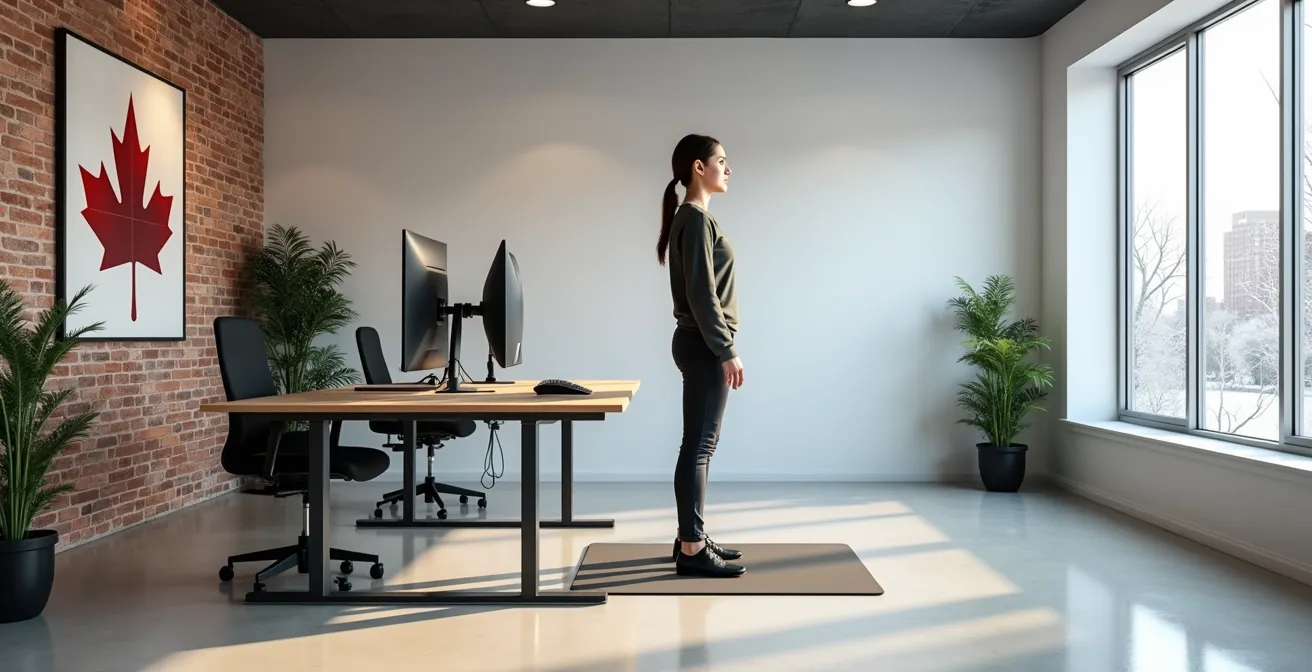
As you can see, a proper standing posture involves more than just “standing up straight.” It requires a neutral spine, relaxed shoulders, and level head, with weight evenly distributed. Reaching this ideal state takes time. A study highlighted in the British Journal of Sports Medicine recommends a gradual build-up, starting with just two hours of standing per day and slowly increasing to four, always alternating with periods of sitting. This gives your muscles, ligaments, and tendons the time they need to adapt and strengthen.
Your Weekly Standing Desk Transition Schedule
- Week 1: Stand for 30 minutes total per day, divided into two 15-minute sessions. Focus on posture.
- Week 2: Increase to 1 hour total per day, using 20-30 minute standing intervals followed by sitting.
- Week 3: Progress to 2 hours total per day, maintaining 30-45 minute standing periods. Listen to your body.
- Week 4: Reach 3 hours total per day with comfortable 45-60 minute standing sessions. Introduce micro-movements.
- Week 5 and beyond: Aim for a sustainable 1:1 or 2:1 sitting-to-standing ratio throughout your 8-hour workday.
Mat or Shoes: Which Investment is Non-Negotiable for Standing Desks?
Once you start standing, the interface between your feet and the floor becomes a critical ergonomic factor. With statistics indicating that 75% of Canadians will experience foot health problems in their lifetime, according to the Ontario Chiropodist Association, choosing the right support is not a luxury but a necessity. The two primary options are an anti-fatigue mat and supportive footwear. While both are beneficial, they serve different functions, and the “non-negotiable” choice depends on your environment and habits.
An anti-fatigue mat works by providing a cushioned, unstable surface. This subtle instability encourages micro-movements in your leg muscles, which promotes blood flow and reduces the strain of static loading. It’s highly effective at mitigating the harshness of concrete or hardwood floors. In contrast, supportive footwear provides structural integrity to your foot itself. Good shoes offer arch support, heel cushioning, and a stable base, preventing the collapse of your arch and ensuring proper alignment of the entire kinetic chain, starting from the ankle.
For Canadian remote workers, the choice is more nuanced. While a mat is excellent for a dedicated home office space, it’s stationary. Supportive indoor shoes offer the flexibility to move around the house without losing that essential support. The “Canadian Winter Consideration” is also real: you need a solution that works after you’ve taken off your heavy, wet winter boots. The following table breaks down the key considerations for each.
| Feature | Anti-Fatigue Mat | Supportive Footwear | Combined Solution |
|---|---|---|---|
| Primary Function | Cushions hard surfaces | Provides arch & heel support | Complete protection system |
| Cost Range (CAD) | $50-200 | $80-300 | $130-500 |
| Effectiveness for 2+ hours | Good for surface cushioning | Good for foot structure | Excellent overall protection |
| Canadian Winter Consideration | Stationary, indoor only | Transitions from outdoor boots | Best year-round solution |
| Maintenance | Wipe clean weekly | Replace every 6-12 months | Both required |
Ultimately, the non-negotiable investment is foot support. For some, a high-quality mat is sufficient. For others, especially those with pre-existing foot conditions like plantar fasciitis, dedicated supportive shoes are essential. The ideal ergonomic protocol, however, combines both: a good mat to stand on and supportive footwear to stand in.
The “Hip Lean” Habit That Causes Scoliosis-Like Pain at Standing Desks
As foot fatigue sets in, your body instinctively seeks relief. One of the most common and destructive compensatory habits is the “hip lean”—shifting your weight predominantly onto one leg and jutting that hip out to the side. While it provides momentary relief to the overloaded leg, this asymmetric posture is a direct path to hip, pelvic, and lower back pain that can mimic the discomfort of scoliosis. It creates a significant imbalance in your kinetic chain, straining the quadratus lumborum (QL) muscle on one side of your lower back while compressing the other.
Case Study: The Simon Fraser University Smart Insole Study
To quantify this issue, a 2019 research project from Simon Fraser University in British Columbia used smart insoles with embedded sensors to track the standing patterns of workers. The study, featured by OHS Canada, found a direct correlation between uneven weight distribution and the onset of foot, hip, and back pain. Participants who consistently favoured one leg showed significantly higher rates of soft tissue discomfort. This provides clear, data-driven evidence that asymmetric postures like the hip lean are a major contributor to standing desk-related injuries.
Breaking this habit requires conscious effort and environmental cues. The goal is to retrain your body to maintain a neutral pelvic position with your weight evenly distributed across both feet, which should be positioned about hip-width apart. Engaging your core muscles slightly can help stabilize your pelvis and prevent you from sinking into one hip. This is a core tenet of active standing: being aware of and correcting these small postural shifts before they become painful habits. If pain persists despite these corrections, it is advisable to seek an assessment from a Canadian registered physiotherapist.
Here are several practical steps to correct a hip-leaning habit:
- Mirror Check: Place a full-length mirror near your desk to visually check your hip alignment. Are they level, or is one higher than the other?
- Weight Shift Drills: Consciously and slowly shift your weight from one foot to the other every 15-20 minutes, or from the balls of your feet to your heels.
- Foot Rail: A small footstool or rail allows you to elevate one foot for a short period, changing the angle of your pelvis and relieving pressure, before switching to the other side. This is a controlled, positive asymmetry, unlike the negative hip lean.
At What Height Should Your Keyboard Be to Prevent Wrist Strain?
While foot and back pain are the most common complaints, an incorrectly configured standing desk can quickly create problems at the other end of the kinetic chain: your wrists. The height of your keyboard and mouse is one of the most critical ergonomic adjustments. If your work surface is too high, you’re forced to shrug your shoulders and bend your wrists upwards (extension). If it’s too low, you’ll hunch forward and bend them downwards (flexion). Both postures compress the delicate nerves and tendons running through the carpal tunnel in your wrist, leading to strain, numbness, and tingling.
The universal ergonomic protocol is to position your keyboard and mouse at a height that allows your elbows to be at a roughly 90-degree angle, with your forearms parallel to the floor. Your wrists should be in a straight, neutral position, as if you were shaking someone’s hand. This minimizes pressure on the median nerve and allows for comfortable, relaxed typing. Achieving this may require a separate keyboard tray, as the ideal height for your keyboard is often different from the ideal height for your monitor.
It’s crucial to re-evaluate this height every time you switch between sitting and standing. A common error is to set the desk height once and assume it’s correct for all positions. However, as one Canadian authority on the matter points out, your posture changes, and so does the ideal ergonomic setup.
Your standing vs. sitting height may differ. Postural shifts when standing can alter the ideal keyboard height relative to the user’s elbow.
– Canadian Centre for Occupational Health and Safety, Office Ergonomics Guidelines
When standing, you may have a more upright torso, which changes the relative position of your elbows. Always perform a quick “90-degree elbow check” after changing your position. This simple, two-second habit is a powerful protocol for preventing the onset of debilitating wrist pain and ensuring your entire upper body remains relaxed and properly aligned.
Why Does Your Ear Contain a Map of Your Entire Body?
The concept that your body is an interconnected system—a kinetic chain—is central to modern ergonomics. Pain in your feet causes issues in your back, and poor desk height leads to wrist problems. Interestingly, this idea of the body as a holistic map is also a cornerstone of ancient healing practices like auriculotherapy, which posits that the outer ear (the auricle) is a microsystem that reflects the entire human body. In this system, the ear is viewed as an inverted fetus, with the head represented on the earlobe and the feet at the very top of the auricle.
While this may seem far from the world of office ergonomics, it serves as a powerful analogy for understanding systemic interconnectedness. The theory suggests that dysfunction or pain in a specific part of the body will manifest as a tender or electrically active point on the corresponding part of the ear. This principle has been the subject of modern scientific inquiry, exploring the neurological links between the ear’s surface and the central nervous system.
The UCLA Study on Auricular Somatotopic Mapping
A study conducted at the UCLA School of Medicine and published in a peer-reviewed pain management journal examined patients with musculoskeletal pain. Researchers found that they could identify the location of a patient’s pain with a high degree of accuracy by measuring areas of increased electrical conductivity on the ear. The study concluded that there was strong evidence supporting the theory of a “somatotopic” map on the ear, where specific ear points correspond to specific body parts.
For someone experiencing standing desk pain, this perspective reinforces a critical takeaway: localized pain is rarely just a local problem. The soreness in your feet is a signal of systemic distress. Whether viewed through the lens of biomechanics or a holistic map on the ear, the message is the same. To solve the problem, you must look beyond the site of the pain and address the entire system—your posture, your movement patterns, and your overall ergonomic setup.
Why Are Squatting, Hinging, and Carrying Essential for Independence?
Correcting your standing desk setup is a reactive measure to reduce pain. The proactive, long-term solution is to build a more resilient body. The reason static postures—both sitting and standing—are so detrimental is that they deprive our bodies of the fundamental movement patterns we evolved to perform. Three of the most critical patterns for human function and physical independence are squatting, hinging, and carrying. Integrating these movements into your daily routine is the ultimate antidote to the static load of office work.
Squatting (sitting down and standing up without using your hands) maintains mobility in your hips, knees, and ankles, and it strengthens your glutes and quads. Hinging at the hips (like in a “good morning” exercise) teaches you to lift with your powerful posterior chain—glutes and hamstrings—instead of your vulnerable lower back. Carrying a load with good posture (a farmer’s carry) builds grip strength and, more importantly, core stability to protect your spine. These aren’t just “exercises”; they are the building blocks of a functional body.
A body that can perform these movements well is a body that is far less susceptible to the strains of a desk job. Strong glutes and a stable core provide the support needed to stand for longer periods without pain. Mobile hips prevent the stiffness that leads to lower back problems. For a Canadian desk worker, a short, effective routine can be a powerful tool to counteract a sedentary day, especially during long winters when outdoor activity is limited. According to CCOHS ergonomics guidelines, workers should alternate positions every 30-45 minutes, and integrating a quick functional fitness break is an ideal way to do this.
Here is a simple, 5-minute routine you can do in your home office:
- 10 Bodyweight Squats: Focus on lowering your hips back and down while keeping your chest up.
- 10 Good Mornings (Hip Hinges): With a slight bend in your knees, push your hips straight back until you feel a stretch in your hamstrings.
- 30-Second Farmer’s Carry: Pick up a heavy item in each hand (e.g., grocery bags, full water bottles) and walk with a tall, proud posture.
- 10 Calf Raises: Slowly rise onto your toes, hold for a moment, and control the descent to stretch your calves.
- 5 Standing Marches per side: Lift your knee toward your chest without leaning back, engaging your core for stability.
Key Takeaways
- Standing desk pain is not caused by standing itself, but by static loading—standing still for too long.
- A successful transition requires a gradual, multi-week protocol, starting with as little as 30 minutes of standing per day.
- The entire body is a kinetic chain; foot pain will lead to back pain if postural imbalances like the “hip lean” are not corrected.
How to Stop Wrist Pain From Turning Into Chronic Carpal Tunnel?
Just as foot pain can signal an impending back problem, wrist discomfort is an early warning sign of a much more serious condition: Carpal Tunnel Syndrome (CTS). What begins as minor aching or tingling after a long day of typing can escalate into a chronic, debilitating condition characterized by persistent numbness, weakness, and sharp, shooting pains. CTS occurs when the median nerve, which runs from your forearm into your hand, becomes compressed or squeezed at the wrist. The ergonomic mistakes discussed earlier—such as improper keyboard height and keeping wrists bent—are direct contributors to this compression.
Preventing the progression from simple wrist strain to chronic CTS requires treating those early symptoms with urgency. The moment you feel tingling, numbness, or aching in your wrists, it is a signal to perform an immediate ergonomic audit. First, re-verify your setup: are your elbows at 90 degrees? Are your wrists straight? Are you taking frequent microbreaks to stretch your hands and fingers? These are non-negotiable first-line defenses.
Furthermore, simple stretches can dramatically improve blood flow and relieve pressure on the median nerve. Gently bending your wrist up and down (flexion and extension) or performing “prayer stretches” can provide significant relief. However, if symptoms persist for more than a week or worsen despite these adjustments, it is crucial to stop the progression in its tracks. Ignoring the signals can lead to permanent nerve damage. This is the ultimate example of the body’s kinetic chain breaking down, where a failure to adhere to proper protocol results in a severe, localized injury with long-term consequences.
By implementing these structured protocols, you can transform your relationship with your standing desk. Begin today by auditing your setup, committing to a gradual transition schedule, and integrating dynamic movement into every part of your workday to ensure your investment in health pays off.